
A guide to colour calibration

Why doesn’t my print
match my screen?

After more than 45 years of digitising and printing artwork, this is the question we’re asked most often. The short answer is physics — the long answer is more interesting, and a few practical steps can close the gap considerably.

The honest truth

Screens and prints
will never agree perfectly.

It’s a frustration nearly every artist has at some point: you spend an evening editing an image until the colours sing on your screen, send it to print, and the result looks subtly — or not so subtly — different. Greens cooler. Reds duller. Skin tones slightly off.

It’s not your fault, and in most cases it’s not the printer’s either. The reason your print never matches your screen is that the two are doing fundamentally different things with light. Once you understand what’s actually going on, the fix becomes much clearer — and the gap, while it never quite closes, narrows considerably.

The physics, in plain English

Two different ways
of making colour.

Your screen

Light, emitted directly

A monitor or phone screen makes colour by mixing red, green and blue light shone straight at your eye. It can produce extremely bright, saturated tones — particularly in the blues, greens and pure whites — because nothing’s in the way.

Brightness varies hugely between devices. A phone in bright daylight is set to dazzle. The same image on a dim laptop in a dark room looks completely different. Most screens aren’t calibrated to any particular standard out of the box.
Your print

Light, reflected back

A printed image works in reverse. Inks on paper absorb some wavelengths of light and reflect others — what you see is whatever the paper bounces back. The brightest a print can ever be is the white of the paper itself, lit by the room.

This means a print can’t reproduce the most saturated colours a screen can show. Pure cyan, pure deep red, anything that needs to glow — the print will always be slightly more muted. That’s not a fault. It’s physics.

What people usually get wrong

Three honest mistakes,
and how to avoid them.

1

Trusting your screen

Most monitors leave the factory set to maximum brightness for showroom appeal — perhaps three times brighter than is sensible for editing. A too-bright screen flatters everything that hits it, then your print arrives looking dull and disappointing.

2

Judging prints under bad light

A print evaluated on the kitchen table at 9pm, lit by warm yellow LED bulbs, is not the same print evaluated by a north-facing window at midday. The light you view a print under changes the print — or rather, changes what your eyes see. If you’re unhappy with a colour, check it again in daylight before deciding.

3

Trusting your own memory of colour

Human colour memory is famously unreliable. The blue you remember from your original painting last week is not the blue your brain reconstructs today. This is why a fixed reference — a calibration print, a Pantone swatch, a known good test image — matters more than any number of side-by-side glances at your own work.

The point, in six words
The screen lied;
the print didn’t.
A useful thing to remember

The Redcliffe Calibration Print

Your bench reference,
printed properly.

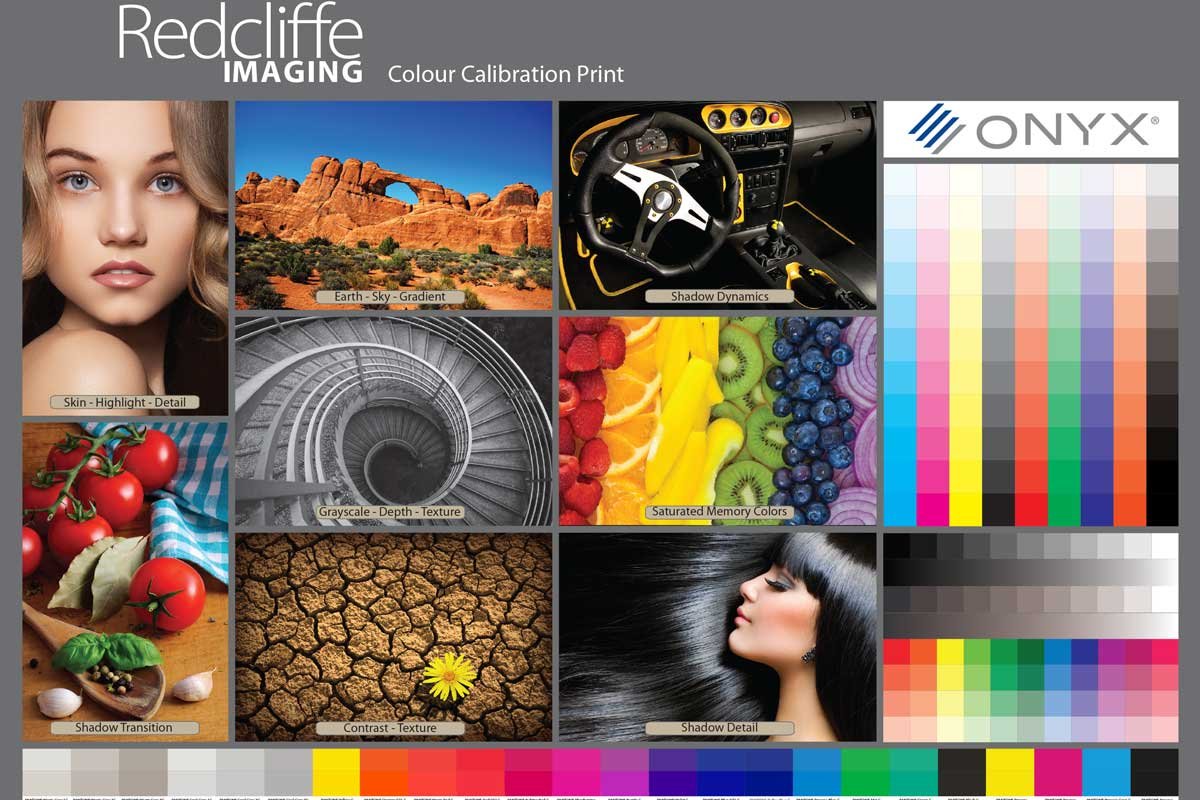
Our calibration print is a single page that contains everything you need to spot-check your setup — skin tones, gradient skies, saturated memory colours, full greyscale ramps, and CMYK and RGB strips. Compare it against your screen, and against your own prints.

The Redcliffe Imaging colour calibration print, featuring skin tones, saturated colours, gradients, greyscale ramps and full CMYK and RGB strips.

What to look for when comparing it

Skin tones Should look natural under daylight — neither too pink nor too yellow. Skin is the most unforgiving test on the page.
Gradient skies Smooth transitions, no banding or harsh steps. Banding usually points to monitor or driver issues.
Greyscale ramp Each grey block should look distinct — no two blocks merging into each other. If the dark end is muddy, your shadows are crushed.
Saturated colours The reds, oranges, blues and greens should look rich but not glowing. If they look flat, your screen brightness is too high.

How to get one

It’s included
in every sample pack.

The Redcliffe Calibration Print is part of every sample pack we send out, alongside our complete range of archival fine art papers. Order a pack and you’ll have it on your studio bench in a few days — a working colour reference, plus papers to feel and test under your own light. A small fee covers postage and the printed papers themselves.

Order a Sample Pack

If it’s still wrong

Send us your file
or just give us a call.

If your prints still don’t match your screen after all that, send us your image and we’ll review it for free — resolution, colour space, anything that might be the source of the drift. Or pick up the phone — we’ve seen most colour problems before, and the advice is always free.

Or contact us directly — support@redcliffe.co.uk  ·  0117 952 0105

Hahnemühle Certified Print Studio Canson Certified Print Studio Fine Art Trade Guild 5★ Google Rating 100% Money Back Guarantee